EX069.04 DocSolutions for CE (DCS)
Introduction
DocSolution for CE extends the native integration between Dynamics 365 Customer Engagement (CE), Business Central (BC) and SharePoint to deliver a unified document experience. It enables CE users (e.g., Sales) and BC users (e.g., Finance) to see, upload and download the very same files, in the same folder structure, with no extra middleware, leveraging the standard CE↔Dataverse↔BC data synchronization.
Typical scenario: a salesperson attaches a Customer Agreement on an Account in CE; moments later, a BC user opens the corresponding Customer card and finds the same file in the DocSolution FactBox.
Prerequisites
- Active Dynamics 365 CE and Business Central environments
- SharePoint Online for file storage
- A data synchronization mechanism between CE and BC (the standard BC↔Dataverse connector is recommended)
Key Features
- New “CE” storage type in BC: in addition to standard SharePoint storage, a CE storage type forces the CE Folder Path to be the mandatory root of the Folder Pattern.
- Cross‑system alignment: once the CE folder is created, synchronization exposes the CE Folder Path to BC, so DocSolution (on BC) points to the same SharePoint container.
- Consistent user experience in CE and BC: upload, download and open files from entity pages (Account/Customer, etc.) with the same structure.
- No additional middleware/APIs: the app operates downstream of the synchronization; no separate integration services required.
Architecture and scenarios
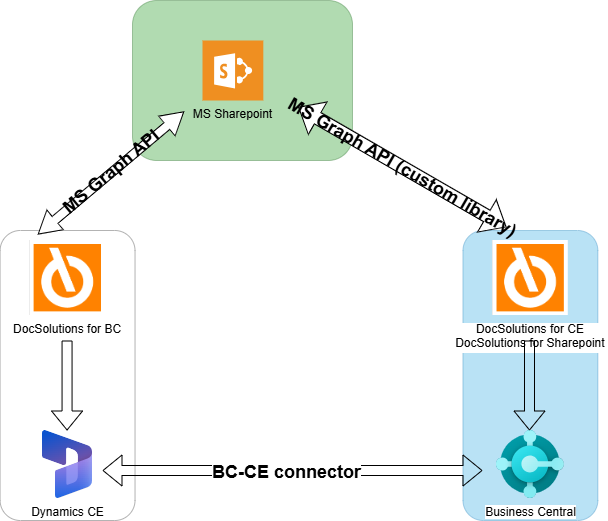
- CE: DocSolution for CE hooks into native SharePoint features, adding app configuration and folder patterns. When a new Account is created, the solution creates the SharePoint folder according to the defined Folder Pattern (e.g.,
{name}-{guid}-DCS). - Synchronization: the BC↔Dataverse connector syncs the “CE Folder Path” (SharePoint folder path for the entity) onto the corresponding record in BC.
- BC: DocSolution for BC leverages DocSolution for SharePoint settings and the new “CE” storage to point to the exact same folder. BC users see files in the FactBox and can operate as usual.
Feedback
Was this page helpful?
Glad to hear it! Please tell us how we can improve.
Sorry to hear that. Please tell us how we can improve.
EOS Labs -