Setup (LCM)
Before managing leasing contracts, the module must be configured once, defining the posting journals to be used. This page describes the general setup.
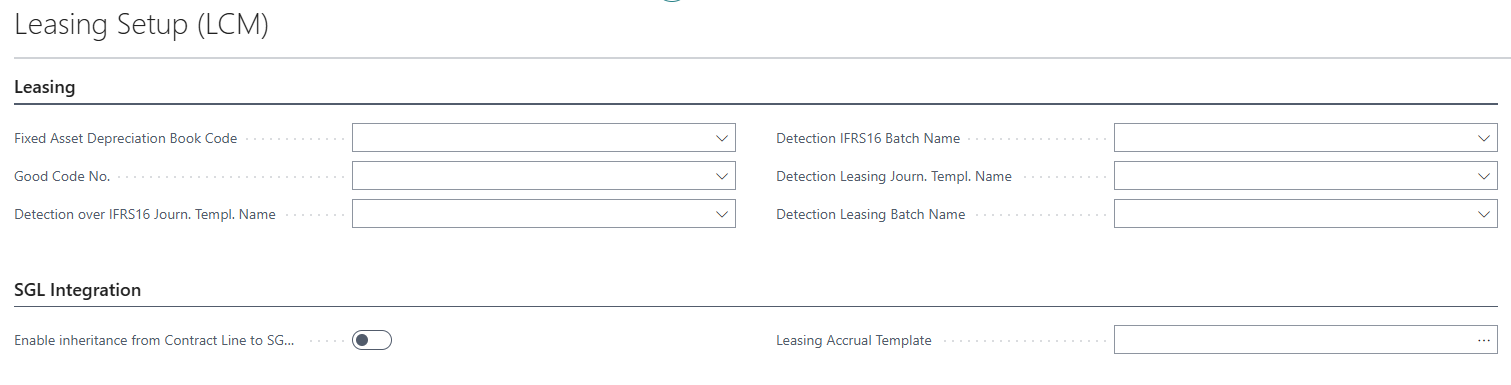
Leasing Setup (LCM) collects the general settings valid for the whole company: the depreciation book to be used for the Right of Use fixed assets, the optional number series for the good code, and the general journals used for the IFRS16 entries and for the periodic interest/debt reduction entries.
Prerequisites
Before starting the configuration, verify that the following already exist in Business Central:
- the number series to be used for internal contracts, for good codes and for Right of Use fixed assets;
- a depreciation book dedicated to Right of Use fixed assets;
- the chart of accounts, including the accounts to be used for debt, interest and the transitory account;
- the fixed asset classes and subclasses to be assigned to the Right of Use assets;
- the general journal templates and batches to be used for the leasing postings;
- the vendor cards of the leasing companies.
Configuration
Search for Leasing Setup (LCM) and fill in the following fields:
| Field | Description |
|---|---|
| Fixed Asset Depreciation Book Code | Depreciation book used for all Right of Use fixed assets created by the module |
| Good Code No. | Optional number series for automatically assigning the code of leased goods |
| Detection over IFRS16 Journ. Templ. Name / Detection IFRS16 Batch Name | General journal template and batch used to post the IFRS16 initial recognition entry |
| Detection Leasing Journ. Templ. Name / Detection Leasing Batch Name | General journal template and batch used to post the periodic interest detection and debt reduction entries |
If the setup record does not exist yet, it is created automatically the first time the page is opened.
SGL Integration
If the EOS Accruals and Simulated General Ledger (SGL) module is also installed in the environment, the SGL Integration section appears on the Leasing Setup (LCM) page, with the fields:
| Field | Description |
|---|---|
| Enable inheritance from Contract Line to SGL Journal Lines | If enabled, accrual data is automatically copied from the contract line to the document line when retrieving installments in a purchase invoice |
| Leasing Accrual Template | Default accrual template proposed for the interest entries |
Feedback
Was this page helpful?
Glad to hear it! Please tell us how we can improve.
Sorry to hear that. Please tell us how we can improve.