gin.exe
Gordon Installer as CLI. Automate the management of your Gordon Suite components
Gordon installer is the easiest and recommended way to install any component/tool that is part of the Gordon Suite. It comes in two different flavours:
The installer UI
You can download the Gordon Installer UI from the Gordon landing page or by using the direct link. This will download and install the Gordon Installer.
A command line utility (gin.exe)
The Gordon Installer CLI is called gin (as in gordon installer). You can find instructions on how to get it on the EOS Solutions Scripts repository on GitHub. There is a script that will download and check if you have the latest version. You can also choose to use the direct link to download gin.exe and put this executable somewhere handy.
Both versions of the installer perform the same operations and support the same features. You are free to choose to use the one you like better or which better suits your scenario.
Gordon Installer uses the concept of scopes to determine where an app is installed and to whom the app will be available. You can consider the scopes to be the same as the usual “Current User” and “All Users” question that you may know from other installers.
You will typically see the scope “user-wide” and “machine-wide” as the primary scopes.
user-wide: Apps installed in this scope will be placed under %localappdata%\Programs\EOS Solutions and are therefore per user. Users without administrative privileges are free to install and uninstall to and from this scope. This is usually the scope where Gordon UI and XLIFF Editor go.
machine-wide: Apps installed in this scope will be placed under %programdata%\Programs\EOS Solutions. Only users with administrative privileges can install into this scope.
Certain apps will require certain scopes. For example, Gordon Service can only be installed into the machine-wide scope because it will register itself as a Windows Service also. Make sure you don’t install your apps into the wrong scope.
If your machine is running docker, you will also see each of your Windows Containers as a scope. This means that you can use Gordon Installer to install something directly into your container from your host machine. This is typically used for installing Gordon Service into one of your Business Central containers.
To see a list of scopes available to you, use the cogwheel button on the top right corner of the Installer UI. Clicking it, will let you change your current scope.
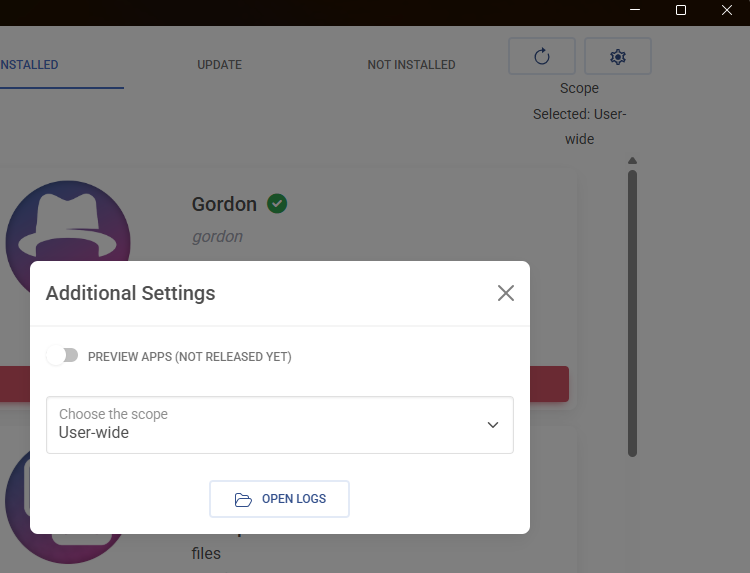
The same goes for gin.exe. You can use the command gin.exe scopes to list them.
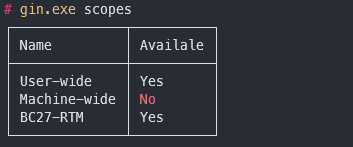
In this case we have the two defaul scopes. Machine-wide is marked as not available because the terminal session was not run with administrative privileges. We also have bc27-rtm as a container-scope.
The app includes a graphical interface, but it only works on newer versions of Windows. On older systems, the interface may not start.
When the interface is not available, you can always use the GIN command-line tool. GIN works on all supported Windows versions.
If the UI doesn’t open, just run GIN instead.
The UI works on:
The UI does not work on:
On any version where the UI does not work, you can always use GIN.
Gordon Installer as CLI. Automate the management of your Gordon Suite components
Was this page helpful?
Glad to hear it! Please tell us how we can improve.
Sorry to hear that. Please tell us how we can improve.